FlowJo™ Portal is now BD Access Portal!
BD Access Portal is our unified user-based licensing platform for FlowJo™ Software, BD Infinicyt™ Software and the BD® Research Cloud solution—providing dongle-free authentication through email and password login credentials. As BD’s licensing ecosystem has grown to support a broader range of innovative products, we’ve chosen a more inclusive name that better reflects these expanded applications.
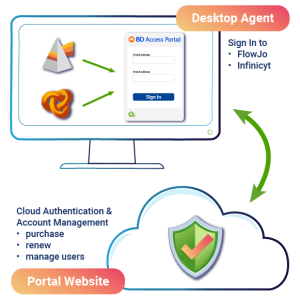
The BD Access Portal consists of two key components:
- BD Access Portal Website: A centralized hub where users can create and manage their Portal accounts, license subscriptions, and access a suite of administrative tools and user benefits.
- BD Access Portal Desktop Agent: A background application that connects and authenticates your software using your Portal account credentials, ensuring a smooth login experience. This BD Access Portal Agent is included with your software installer (FlowJo™ v11 and Infinicyt™ v3.0) and must be installed and running for authentication.
As we complete this transition, you may still encounter references to both “FlowJo™ Portal” and “BD Access Portal” in our documentation. We appreciate your patience during this transition and update.
___________
BD Access Portal FAQs
- Transition from FlowJo™ Portal
- Why is FlowJo™ Portal changing its name to BD Access Portal?
BD Access Portal reflects the expansion of BD’s user-based licensing system beyond FlowJo™ Software to include BD Infinicyt™ Software, BD® Research Cloud and future products. It’s a more inclusive name for a growing ecosystem. - Will my existing FlowJo™ Portal account still work?
Yes. Your current account credentials will continue to work in BD Access Portal without any changes. - Do I need to take any action during this transition?
No immediate action is required. You may notice both names in documentation while we complete the transition.
2. Licensing & Authentication
- What is BD Access Portal used for?
It’s a centralized system for user-based licensing and dongle-free authentication for BD software products. - Do I still need a dongle to use FlowJo™ or BD Infinicyt™?
No. BD Access Portal replaces dongle-based authentication with account-based access. - Which products are supported by BD Access Portal?
Currently:
- FlowJo™ v11 Software and above
- BD Infinicyt™ v3.0 Software and above
- BD® Research Cloud
- More products may be added in the future.
3. Account & Access
- How do I create or update my BD Access Portal account?
Visit BD Access Portal website to register or manage your account. - Can I manage multiple licenses or users under one account?
Yes. Administrative tools allow license management for individuals and teams. - What if I forget my password or can’t log in?
Use the “Forgot Password” link on the login page or contact support for help.
4. BD Access Portal Desktop Agent
- What is the desktop agent?
It’s a lightweight application that connects your software to your BD Access Portal account for seamless authentication. - Is it required for all BD software?
BD Access Portal is required for FlowJo™ v11 Software and Infinicyt™ v3.0 Software - How do I install it?
Installation instructions and other supporting documentation are available Here.
5. Navigation & Tools
- Where can I manage subscriptions and licenses?
Log into the BD Access Portal website to access your dashboard and tools - What are the benefits of BD Access Portal?
- Dongle-free access
- Centralized license management
- Support for multiple BD products
- Streamlined user experience
6. Support
- Supporting Documentation: https://docs.flowjo.com/portal/
- Login FAQs: https://www.flowjo.com/docs/flowjo11/license-info/login_faqs
- Email flowjo@bd.com with the issue you are encountering.